This post provides a quick overview of the steps necessary to apply the MVVM pattern in a Kotlin Multiplatform application.
The starting point is a freshly downloaded project template from the Kotlin Multiplatform Wizard.

This post does not explain what MVVM is or discuss its pros and cons. Its main purpose is to serve as a concise note on the steps I take in a fresh project whenever I need this pattern.
The result of this post is a simple application that displays a counter. The user can start and stop the counter by pressing the corresponding buttons.
This is how it will look.
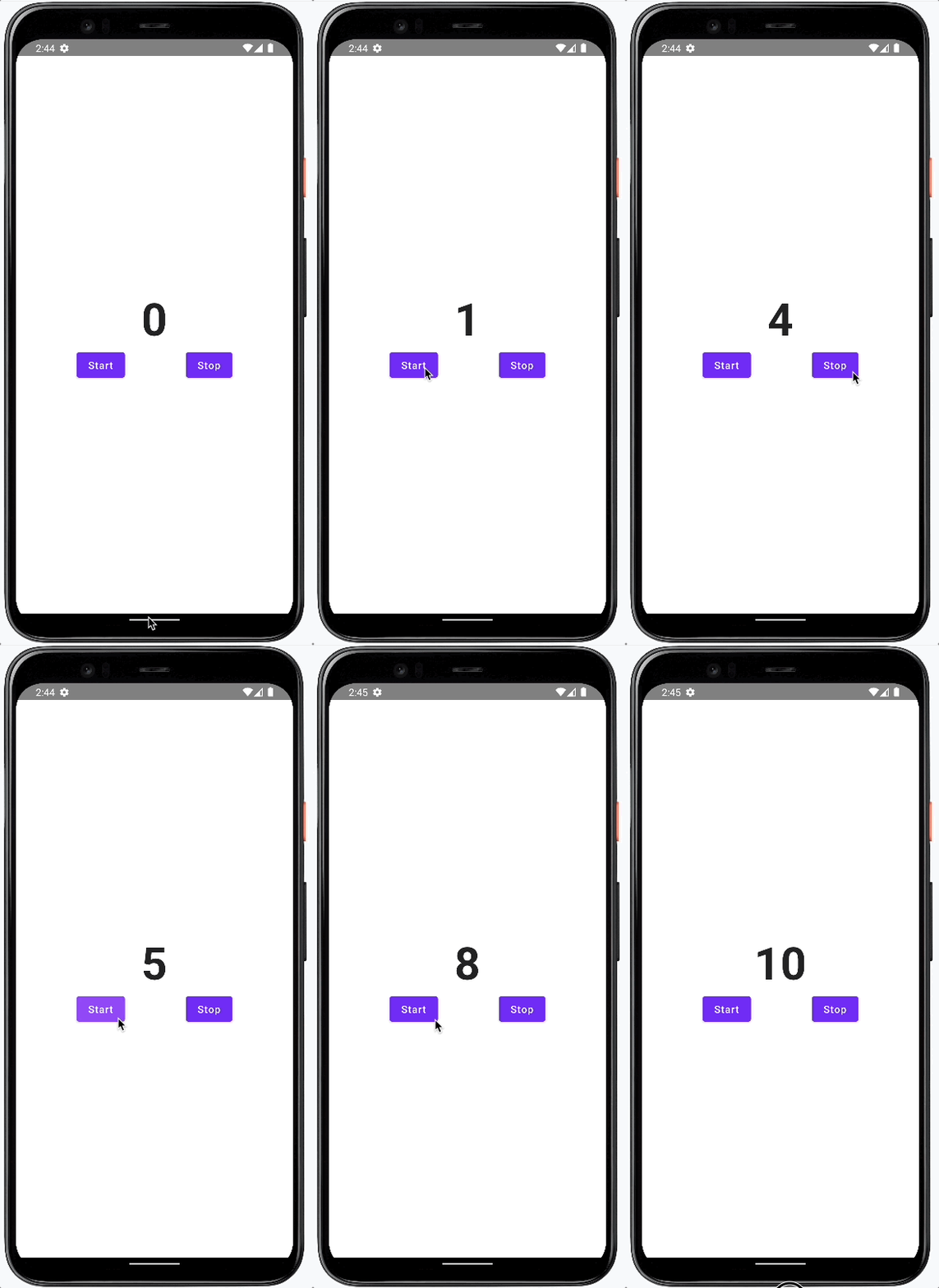
We follow a bottom-up approach and will add or modify these parts of the app:
- Gradle Dependencies
- States and Events
- Repository
- View-Model
- View
- Application
Gradle Dependencies
For my multiplatform projects I use MOKO MVVM.
In gradle/libs.versions.toml, add the required version and modules.
[versions]
mvvm = "0.16.1"

[libraries]
mvvm-compose = { module = "dev.icerock.moko:mvvm-compose", version.ref = "mvvm" }
mvvm-core = { module = "dev.icerock.moko:mvvm-core", version.ref = "mvvm" }
Then reference the dependencies in composeApp/build.gradle.kts.
kotlin {
 androidTarget {
 compilations.all {
  kotlinOptions {
  jvmTarget = "17"
  }
 }
 }
 sourceSets {
 commonMain.dependencies {
  implementation(libs.mvvm.core)
  implementation(libs.mvvm.compose)
 }
 }
}

android {
 compileOptions {
 sourceCompatibility = JavaVersion.VERSION_17
 targetCompatibility = JavaVersion.VERSION_17
 }
}
States and Events
The view and the view model communicate solely through states and events.
Create the state in composeApp/src/commonMain/kotlin/NumberState.kt.
data class NumberState(
 val number: Int
)
Add the event in composeApp/src/commonMain/kotlin/NumberEvent.kt.
sealed class NumberEvent {
 object Start: NumberEvent()
 object Stop: NumberEvent()
}
Repository
Data comes from the repository created in composeApp/src/commonMain/kotlin/NumberRepository.kt.
import kotlinx.coroutines.CoroutineScope
import kotlinx.coroutines.Dispatchers
import kotlinx.coroutines.Job
import kotlinx.coroutines.delay
import kotlinx.coroutines.flow.MutableStateFlow
import kotlinx.coroutines.flow.asStateFlow
import kotlinx.coroutines.launch

class NumberRepository {
 private val _number = MutableStateFlow(0)
 val number = _number.asStateFlow()

 private var job: Job? = null

 fun start() {
  job = CoroutineScope(Dispatchers.Default).launch {
   while (true) {
    delay(1000)
    _number.value += 1
   }
  }
 }

 fun stop() {
  job?.cancel()
 }
}
View Model
Create the view model in composeApp/src/commonMain/kotlin/NumberViewModel.kt.
import dev.icerock.moko.mvvm.viewmodel.ViewModel
import kotlinx.coroutines.flow.MutableStateFlow
import kotlinx.coroutines.flow.asStateFlow
import kotlinx.coroutines.flow.update
import kotlinx.coroutines.launch

class NumberViewModel(val repository: NumberRepository): ViewModel() {

 val _state = MutableStateFlow(NumberState(0))
 val state = _state.asStateFlow()

 init {
  viewModelScope.launch {
   repository.number.collect { newNumber ->
    _state.update {
     it.copy(number = newNumber)
    }
   }
  }
 }

 fun onEvent(event: NumberEvent) {
  when (event) {
   NumberEvent.Start -> repository.start()
   NumberEvent.Stop -> repository.stop()
  }
 }
}
View
As the second-to-last step, create the view in composeApp/src/commonMain/kotlin/NumberView.kt.
@Composable
fun NumberView(state: NumberState, onEvent: (NumberEvent) -> Unit) {
 Column(
  modifier = Modifier.fillMaxSize(),
  verticalArrangement = Arrangement.Center,
  horizontalAlignment = Alignment.CenterHorizontally
 ) {
  Column {
   Text(
    text = "${state.number}", fontSize = 64.sp, fontWeight = FontWeight.Bold
   )
  }

  Row(
   modifier = Modifier.fillMaxWidth(), horizontalArrangement = Arrangement.SpaceEvenly
  ) {
   Button(onClick = { onEvent(NumberEvent.Start) }) {
    Text("Start")
   }
   Button(onClick = { onEvent(NumberEvent.Stop) }) {
    Text("Stop")
   }
  }
 }
}
Application
Finally, wire everything up in the top-level App composable: composeApp/src/commonMain/kotlin/App.kt
import androidx.compose.material.MaterialTheme
import androidx.compose.runtime.Composable
import androidx.compose.runtime.collectAsState
import androidx.compose.runtime.getValue
import dev.icerock.moko.mvvm.compose.getViewModel
import dev.icerock.moko.mvvm.compose.viewModelFactory
import org.jetbrains.compose.resources.ExperimentalResourceApi

@Composable
fun App() {
 MaterialTheme {
  val numberRepository = NumberRepository()
  val numberViewModel = getViewModel(
   Unit,
   viewModelFactory { NumberViewModel(numberRepository) }
  )
  val state by numberViewModel.state.collectAsState()

  NumberView(state, numberViewModel::onEvent)
 }
}
That’s it— the out-of-the-box multiplatform project template has been extended with an MVVM pattern that you can customize and extend as needed.