A Practical Introduction
In this tutorial you’ll learn the basics of Jetpack Compose Navigation— a set of related classes that help you create clear, well-structured navigation code for your Android app. Using these classes simplifies navigation logic and makes it easier to maintain and update. Let’s get started!
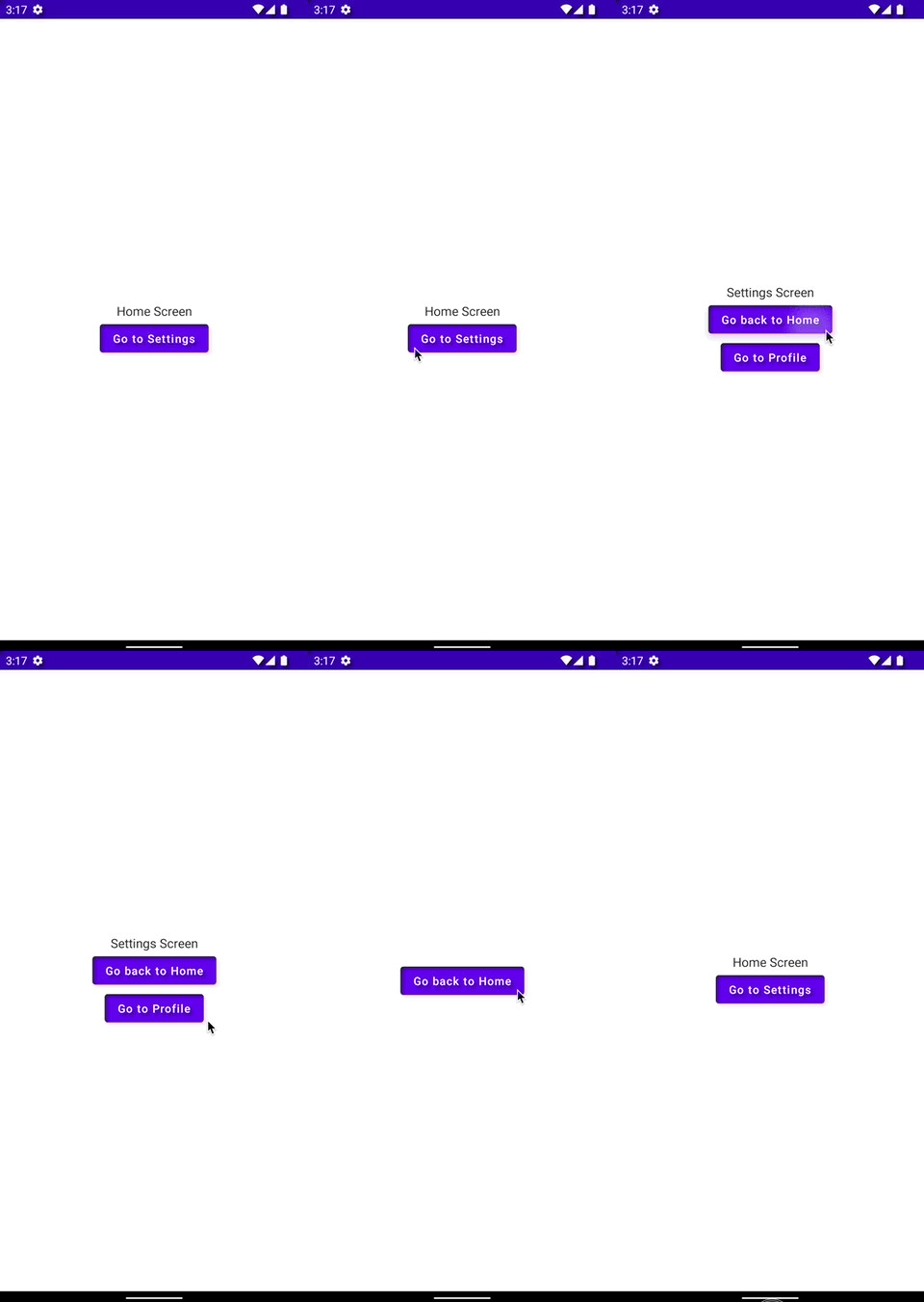
This is what we will build:
The animation below shows a finished example application where the user can navigate between several views. To achieve this, the tutorial guides you through the use of the NavHost, NavController, and the composable function from the Navigation library.
Dependencies
To use Jetpack Compose Navigation, add the following dependency to your build.gradle:
dependencies {
...
 implementation 'androidx.navigation:navigation-compose:2.5.3'
}
The Code
The code below shows the full example used in the animation above. We’ll go through it step-by-step in the following paragraphs.
@Composable
fun NavigationView() {
 val navController = rememberNavController()
 NavHost(navController = navController, startDestination = "home") {
 composable("home") {
  HomeScreen(navController)
 }
 composable("settings") {
  SettingsScreen(
  onHome = { navController.popBackStack() },
  onProfile = { navController.navigate("profile") }
  )
 }
 composable("profile") {
  ProfileScreen { navController.popBackStack("home", false) }
 }
 }
}

@Composable
fun HomeScreen(navController: NavHostController) {
 Column(
 Modifier.fillMaxSize(),
  horizontalAlignment = Alignment.CenterHorizontally,
  verticalArrangement = Arrangement.Center
 ) {
 Text("Home Screen")
 Button(onClick = { navController.navigate("settings") }) {
  Text("Go to Settings")
 }
 Button(onClick = { navController.navigate("about") }) {
  Text("Go to About")
 }
 }
}

@Composable
fun SettingsScreen(onHome: () -> Unit, onProfile: () -> Unit) {
 Column(
 Modifier.fillMaxSize(),
 horizontalAlignment = Alignment.CenterHorizontally,
 verticalArrangement = Arrangement.Center
 ) {
 Text("Settings Screen")
 Button(onClick = onHome) { Text("Go back to Home") }
 Button(onClick = onProfile) { Text("Go to Profile") }
 }
}

@Composable
fun ProfileScreen(onHome: () -> Unit) {
 Column(
 Modifier.fillMaxSize(),
 horizontalAlignment = Alignment.CenterHorizontally,
 verticalArrangement = Arrangement.Center
 ) {
 Button(onClick = onHome) {
  Text("Go back to Home")
 }
 }
}
The full Android Studio project can be found in my Github-repository of Android and iOS code examples.
A basic Jetpack Compose Navigation setup includes these components: NavHost, NavController, and the composable function. The NavHost is the container that holds all navigation destinations. The NavController manages navigation between destinations and the navigation back stack. The composable function is used to declare a specific destination within the NavHost.
The navigation stack is the order of composables the user has navigated through, with the current composable on top. Functions such as navigate, popUpTo, and popBackStack are used to manage that stack.
navigatemoves from one composable to another (for example, fromHomeScreentoSettingsScreen). It takes the destination name as a string and optionally accepts arguments to pass data to the destination.popUpTonavigates back to a specific composable in the stack and removes all composables added after it (for example,popUpTo("home")returns toHomeScreen, discardingSettingsScreenandProfileScreen).popBackStacknavigates back one step in the stack, discarding the current composable and returning to the previous one.
Note: In the example code, the “about” route is navigated to from HomeScreen, but there is no corresponding composable declared for “about” in the NavHost.
In the provided code, there are two areas that could be improved.
Firstly, passing the NavController into a view is considered an anti-pattern and should be avoided. Views should not be aware of navigation; they should only inform a parent about events that might require navigation. The parent can then handle navigation logic without involving the view.
Secondly, using raw strings for navigation routes is error-prone. A simple typo can cause runtime crashes and make debugging difficult. Use enums or sealed classes to represent routes instead— this gives compile-time safety and prevents typos.
Implementing these best practices makes your code easier to maintain, more organized, and less prone to errors.
That wraps up this brief introduction. I hope you found it helpful and informative. Please leave a comment if you have any questions or suggestions.
Thank you for reading!