Event-driven architectures have become popular in recent years, and Kafka is the de facto standard for this tooling.
This post provides a complete example of an event-driven architecture implemented with two Python services that communicate via Kafka.
The main goal of this tutorial is to provide a working example without diving into details that would distract from the primary task of getting something up and running quickly.
We have a couple of building blocks:
- Infrastructure (Kafka, Zookeeper)
- Producer (Python service)
- Consumer (Python service)
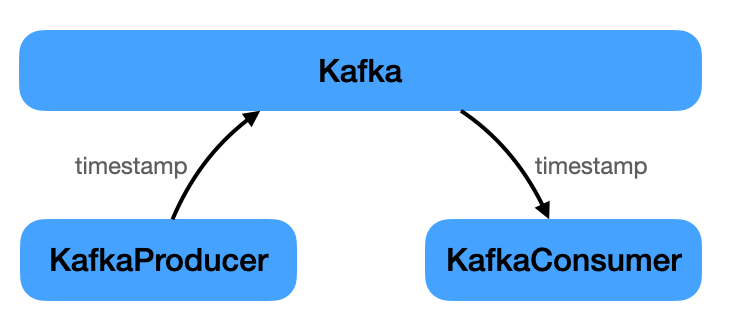
The producer ‘s sole task is to periodically send an event to Kafka containing a timestamp. The consumer listens for this event and prints the timestamp.
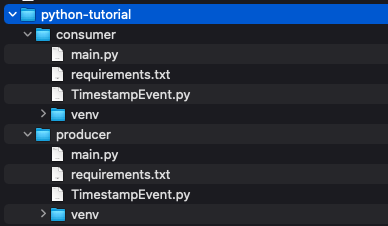
The implementation resulted in the following project structure.
The complete code can be downloaded from here.
Infrastructure
Only two components (despite the services) are needed to get an event-based architecture up and running: Kafka and Zookeeper.
Check the resources section at the end of this tutorial for links to both.
While Kafka is the primary component for exchanging events, Zookeeper is required for several reasons. From the Zookeeper website:
ZooKeeper is a centralized service for maintaining configuration information, naming, providing distributed synchronization, and providing group services.
Below is the docker-compose.yml to bring both up and running:
version: '3'

services:

  kafka:
   image: wurstmeister/kafka
   container_name: kafka
   ports:
    - "9092:9092"
   environment:
    - KAFKA_ADVERTISED_HOST_NAME=127.0.0.1
    - KAFKA_ADVERTISED_PORT=9092
    - KAFKA_ZOOKEEPER_CONNECT=zookeeper:2181
   depends_on:
    - zookeeper

  zookeeper:
   image: wurstmeister/zookeeper
   ports:
    - "2181:2181"
   environment:
    - KAFKA_ADVERTISED_HOST_NAME=zookeeper
When this is in place, only the two services implementing the “business domain” are needed. A very simple example: sending and receiving a timestamp.
Code Setup
There are two Python projects; all code for each project is in its main.py.
Each has a single dependency listed in its requirements.txt:
kafka-python==2.0.2
Install this dependency for each project using the following command:
python3 -m pip install -r requirements.txt
Producer
As mentioned above, the producer generates timestamps and sends them via Kafka to any interested consumers.
from kafka import KafkaProducer
from datetime import datetime
from json import dumps
from time import sleep

producer = KafkaProducer(bootstrap_servers='localhost:9092',
             value_serializer=lambda x: dumps(x).encode('utf-8'))
while True:
  timestampStr = datetime.now().strftime("%H:%M:%S")
  print("Sending: " + timestampStr)
  producer.send('timestamp', timestampStr)
  sleep(5)
When creating the producer we provide two pieces of information:
bootstrap_servers: where to find Kafka. This could have been omitted becauselocalhost:9092is the default.value_serializer: how messages will be encoded.
Messages will be sent to the timestamp topic. That matters so the consumer can listen only to messages from this topic.
That is all for the producer. On to the consumer.
Consumer
Now we receive the timestamps sent by the producer.
from kafka import KafkaConsumer
from json import loads

consumer = KafkaConsumer('timestamp',
             value_deserializer=lambda x: loads(x.decode('utf-8')))

for message in consumer:
  print(message.value)
This time we did not provide bootstrap_servers as we did with the consumer. It will default to localhost:9092.
The necessary parameters are:
- The topic the consumer will listen to:
timestamp. value_deserializer: How messages will be decoded after they have been received. Note: This needs to be compatible with the producer’svalue_serializer.
Everything is in place now. Ready for some action.
Run Example Code
It ‘s time to run everything. Remember the following project structure:
code /
- docker-compose.yml
- producer
-- main.py
- consumer
-- main.py
In the code directory, Kafka and ZooKeeper are started via docker-compose:
docker-compose up -d
After changing into the producer directory, start the service with:
$ source venv/bin/activate
(venv) $ python3 main.py
Finally, in a new terminal window, change into the consumer directory and start the service the same way:
$ source venv/bin/activate
(venv) $ python3 main.py
Now you should see something like this. On the left is the producer’s log output and on the right is the consumer’s log output.

Congratulations if you made it this far. It should have been fairly easy to follow. If not, let me know how to improve this tutorial.
Cleanup
When done, you can leave the Python environment by typing:
(venv) $ deactivate
Docker services are still running and must be stopped and cleaned up.
The command below does the following:
- Stops all running Docker containers
- Deletes stopped Docker containers
- Removes all Docker volumes
$ docker-compose stop && docker-compose rm -f && docker volume prune -f
Stopping kafka              ... done
Stopping kafka-python-tutorial_zookeeper_1... done
Going to remove kafka, kafka-python-tutorial_zookeeper_1
Removing kafka              ... done
Removing kafka-python-tutorial_zookeeper_1... done
Deleted Volumes:
e4380413983bb36f914621dac4019565cd9ed130c04c5336c898874b648c2c92
120ab4ab7e227bdc5ee155d1cc61f29b1b0f8d7ed2fa9ee29deb05c90e33b8fe
0636bf46ec05cdda15deec280cdef672c68366a7d8d57ff424938069498e4063

Total reclaimed space: 67.13MB
Conclusion
This concludes the tutorial on creating an event-driven architecture using Kafka and Python.
The complete project code can be downloaded from here.