This is another MIDI-related post, but this time a Raspberry Pi and some LEDs are involved.
The result of my previous MIDI experiments was MIDI Aid for Mac and MIDI Aid for iPad, iPhone and iPod touch. Those apps are perfect for understanding what a controller sends to your macOS or iOS device. I have explained the theory of how MIDI messages look already in [this post]({% post_url 2016-01-19-anatomy-of-midi-message %}).
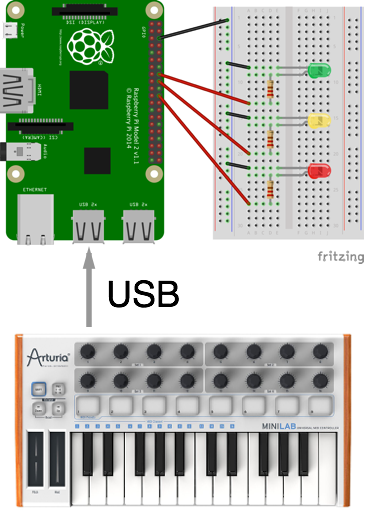
The objective this time was to send MIDI to a Raspberry Pi to control some LEDs. Specifically, when hitting middle C a green LED should light up; when hitting the D above it a yellow LED; and when the E is pressed a red LED should light.
Please note that the MIDI controller is connected directly via USB, not via the standard 5-pin DIN connector.
Of course someone else on the internet had a similar task and thankfully blogged about it. This was my starting point.
First I wired everything up.
Then I changed the code to meet my objective:
{% gist db20d8dade08e7f04787 hello-midi.py %}
This can easily be extended for more keys and LEDs or whatever you want to control with your MIDI controller.
Finally, I took a short video of how it works:
Done for today!