Installing Graphite on CentOS 6.2
Having installed RabbitMQ and Sensu in the last post, we now need a way to visualize all the data we have gathered. For this purpose we start with Graphite to plot continuous data.
Installing Graphite was quite an adventure since it was hard to find an adequate installation procedure. There are no official RPMs, so I had to build my own.
With the hint of a colleague, I was able to get the whole thing done using the following three-part blog post series:
- Installing Graphite on CentOS - Part 1 - Building the RPMs
- Installing Graphite on CentOS - Part 2 - Setting up Graphite
- Installing Graphite on CentOS - Part 3 - Posting some Data to Graphite
First, get all the dependent software needed for building the RPMs and for running Graphite.
yum install -y gcc zlib-devel curl curl-devel openssl rpm-build gcc-c++ rpm-build python python-ldap python-memcached python-sqlite2 pycairo python-twisted Django django-tagging bitmap bitmap-fonts python-devel glibc-devel gcc-c++ openssl-devel python-zope-interface httpd memcached mod_wsgiOn my virtual machine I also needed wget:
yum install -y wgetAn Experiment
Although the blog post used version 0.9.9, I tried version 0.9.10. You might want to skip these steps— it did not work out for me and I reverted to 0.9.9.
As a normal user, do the following:
cd
mkdir rpmbuild
mkdir rpmbuild/SOURCES
cd rpmbuild/SOURCES
wget http://launchpad.net/graphite/0.9/0.9.10/+download/whisper-0.9.10.tar.gz
wget http://launchpad.net/graphite/0.9/0.9.10/+download/carbon-0.9.10.tar.gz
wget http://launchpad.net/graphite/0.9/0.9.10/+download/graphite-web-0.9.10.tar.gz
cp carbon-0.9.10.tar.gz carbon-0.9.10.tar.gz.orig
cp graphite-web-0.9.10.tar.gz graphite-web-0.9.10.tar.gz.orig
cp whisper-0.9.10.tar.gz whisper-0.9.10.tar.gz.origtar -zxvf whisper-0.9.10.tar.gz
cd whisper-0.9.10
python setup.py bdist_rpm
rpm -ivh dist/whisper-0.9.10-1.src.rpm
cd..
cp whisper-0.9.10.tar.gz.orig whisper-0.9.10.tar.gz
cd../SPECS/Edit the spec if you want to add a suffix to the release information or add a description:
vi whisper.spec
rpmbuild -ba whisper.spec
sudo yum --nogpgcheck localinstall -y../RPMS/noarch/whisper-0.9.10-1.noarch.rpm
Now do the same for carbon and graphite:
cd ~/rpmbuild/SOURCES/
tar -zxvf graphite-web-0.9.10.tar.gz
cd graphite-web-0.9.10
python setup.py bdist_rpm
I got this error:
error: error in 'post_install' option: 'distro/redhat/misc/postinstall' does not exist or is not a fileI searched for files containing “distro” with
grep -iR 'distro' *. The results were
setup.cfg and MANIFEST.in, where I changed
“distro” to “dist”. The command then ran, but the directory “dist”
did not exist. I removed everything and continued with the 0.9.9
versions of whisper, carbon, and graphite.
Building the RPMs and installing Graphite
cd ~/rpmbuild/SOURCES
wget http://launchpad.net/graphite/0.9/0.9.9/+download/whisper-0.9.9.tar.gz
wget http://launchpad.net/graphite/0.9/0.9.9/+download/carbon-0.9.9.tar.gz
wget http://launchpad.net/graphite/0.9/0.9.9/+download/graphite-web-0.9.9.tar.gz
cp carbon-0.9.9.tar.gz carbon-0.9.9.tar.gz.orig
cp graphite-web-0.9.9.tar.gz graphite-web-0.9.9.tar.gz.orig
cp whisper-0.9.9.tar.gz whisper-0.9.9.tar.gz.orig
cd ~/rpmbuild/SOURCES/
tar -zxvf whisper-0.9.9.tar.gz
cd whisper-0.9.9
python setup.py bdist_rpm
rpm -ivh dist/whisper-0.9.9-1.src.rpm
cd..
cp whisper-0.9.9.tar.gz.orig whisper-0.9.9.tar.gz
cd../SPECS/
rpmbuild -ba whisper.spec
sudo yum --nogpgcheck localinstall -y../RPMS/noarch/whisper-0.9.9-1.noarch.rpmcd ~/rpmbuild/SOURCES/
tar -zxvf graphite-web-0.9.9.tar.gz
cd graphite-web-0.9.9
python setup.py bdist_rpm
rpm -ivh dist/graphite-web-0.9.9-1.src.rpm
cd../
cp graphite-web-0.9.9.tar.gz.orig graphite-web-0.9.9.tar.gz
cd../SPECS/
rpmbuild -ba graphite-web.spec
sudo yum --nogpgcheck localinstall -y../RPMS/noarch/graphite-web-0.9.9-1.noarch.rpmcd ~/rpmbuild/SOURCES/
tar -zxvf carbon-0.9.9.tar.gz
cd carbon-0.9.9
python setup.py bdist_rpm
rpm -ivh dist/carbon-0.9.9-1.src.rpm
cd..
cp carbon-0.9.9.tar.gz.orig carbon-0.9.9.tar.gz
cd../SPECS/
rpmbuild -ba carbon.spec
sudo yum --nogpgcheck localinstall -y../RPMS/noarch/carbon-0.9.9-1.noarch.rpmContinue with part two of the blog post series to set up Graphite.
Configuration
The post installs some dependencies (a partial repetition of what we already did). RPMS are installed as well, but we ’ve already covered that.
Next, set up carbon and graphite-web configuration files:
cd /opt/graphite/conf/
sudo cp graphite.wsgi.example graphite.wsgi
sudo cp storage-schemas.conf.example storage-schemas.conf
sudo cp carbon.conf.example carbon.conf
cd../webapp/graphite
sudo cp local_settings.py.example local_settings.py
Edit local_settings.py:
sudo vim local_settings.pyI added/uncommented/edited the following lines:
TIME_ZONE = 'Europe/Berlin'
MEMCACHE_HOSTS = ['127.0.0.1:11211']
Create the Django database:
sudo python /opt/graphite/webapp/graphite/manage.py syncdbYou will be asked to create a superuser. I answered “no”.
Next: Apache and mod_wsgi. I already had those installed, but if
you need them run
sudo yum install -y httpd mod_wsgi.
Create /etc/httpd/conf.d/graphite.conf as described
in the blog post.
Make /etc/httpd/conf.d/wsgi.conf look like this:
LoadModule wsgi_module modules/mod_wsgi.so
WSGISocketPrefix /var/run/wsgi
Set ownership for the storage directory:
chown -R apache:apache /opt/graphite/storage/Create a start/stop script /etc/init.d/carbon-cache
as described in the post and make it executable:
sudo chmod +x /etc/init.d/carbon-cacheStart services as root:
service memcached start
service carbon-cache start
service httpd start
Test the webapp by pointing your browser to
http://localhost:9080. My ports differ because I am
using Vagrant with port forwarding.
Initially it did not work. In
/var/log/httpd/graphite_error_log I saw:
IOError: [Errno 13] Permission denied: '/opt/graphite/storage/log/webapp/info.log'The file didn’t exist and it was a permissions issue. After some searching I ran:
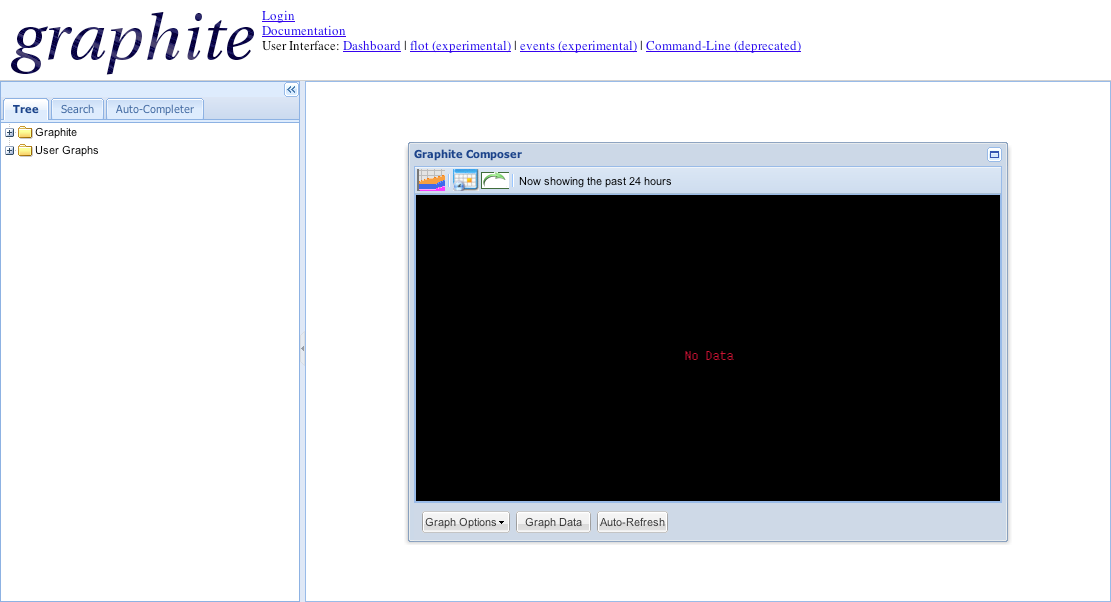
chown -R apache:apache /opt/graphite/storageThat fixed it— the webapp worked. (I thought I had already run that command earlier.)
Feeding Data into Graphite
Now let’s get some data and visualize it. The last part of the blog post explains this in detail.
Graphite listens on ports 2003 and 2004 for incoming data. You
can check that by running nmap -v -sT localhost. The
format of the data is: object value timestamp.
I’m not repeating the blog post’s example here; instead, here’s an example using a Sensu community plugin:
$ gem install sensu-plugin --no-rdoc --no-ri
$ cd /etc/sensu/plugins
$ wget https://raw.github.com/sensu/sensu-community-plugins/master/plugins/system/cpu-metrics.rb
$ chmod +x cpu-metrics.rb
Add the following section to
/etc/sensu/conf.d/client.json:
{
    ...
    "checks": {
        ...
        "cpu_metrics": {
            "type": "metric",
        "handlers": ["graphite"],
        "command": "/etc/sensu/plugins/cpu-metrics.rb --scheme stats.:::name:::",
        "interval": 60,
        "subscribers": [ "webservers" ]
        }
    }
}
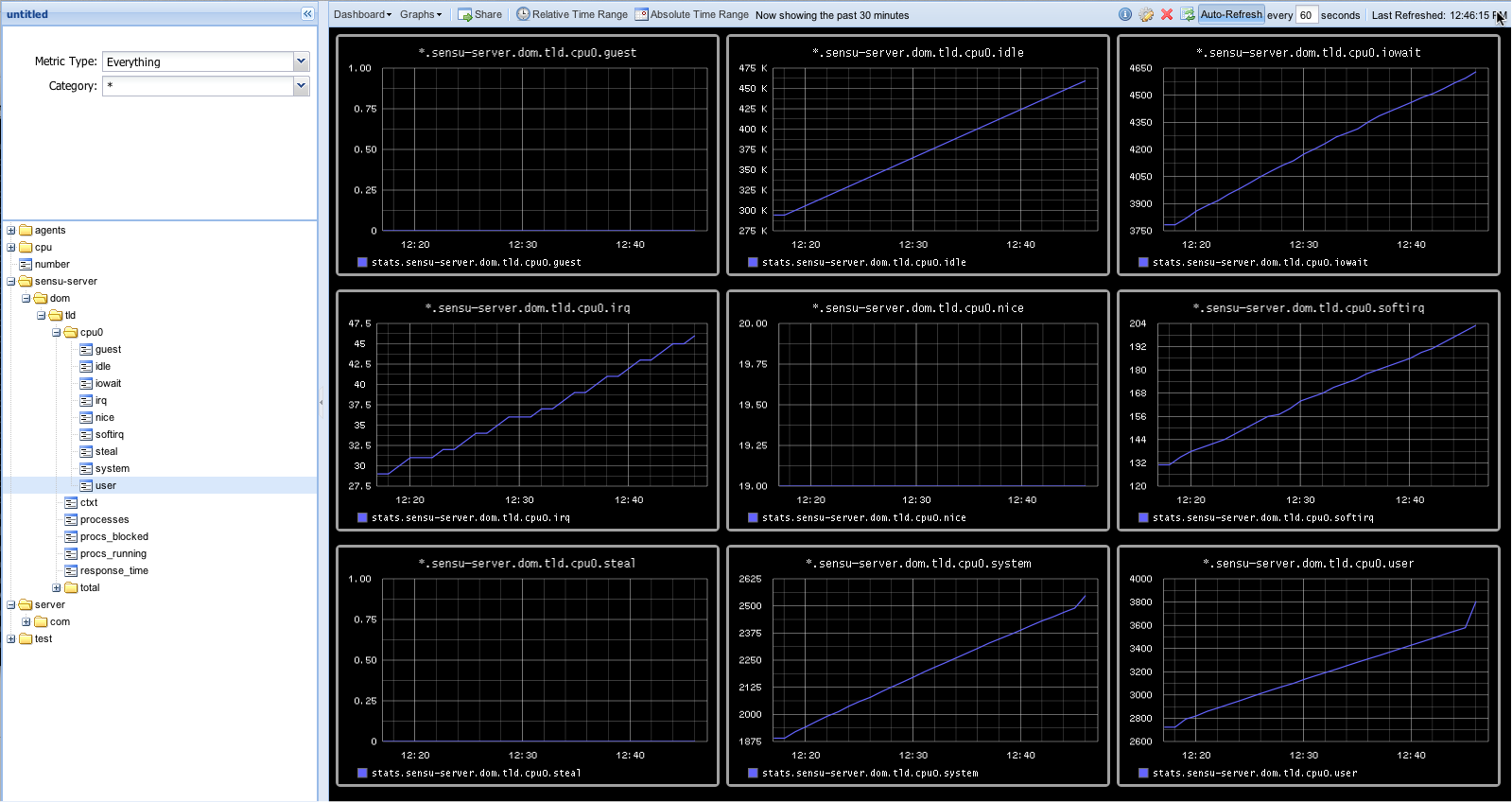
In Graphite I then selected a few of those metrics to visualize on the dashboard:
That completes this article. The original blog post continues with more ways to gather data and feed it into Graphite— check it out!
Done for today.