Now, we can get some stuff done since we are able to create virtual boxes on the fly and destroy them whenever we mess them up … and we will mess them up pretty often, I suppose.
In the last blog post we installed Puppet. This will help us improve our system configurations step by step and build lots of different boxes for different purposes. Most of all, our boxes will be consistent.
Don’t act like a machine
Not that long ago, I had to look after some test servers for a company that used them for manual testing. The boxes themselves basically had the same layout, only the versions of some software components were different. Basically … we’re talking about eight virtual machines that were created, configured, and maintained 100% manually. Every day there were different issues, or let’s say inconsistencies. The boxes degraded in quality over time. Setting up new boxes always resulted in missing components, or components with the wrong versions, or components that had not been properly configured. Yes, it was a checklist-based approach: follow checklist A to create the machine, then checklist B to configure it, and so on.
In my experience the following holds true:
human + checklist = automation
Some people are afraid of that. Especially in times of economic recessions and layoffs. My takeaway: never follow any checklists; be the one who knows how to automate processes to stay in the market.
Let’s get technical again.
”Hello World” using Puppet
Luckily I found the following tutorial at Bitfield Consulting. It helped a lot with building a simple Puppet configuration that prints “Hello Puppet.” This configuration will be the starting point for more complex configurations in the future. For now, we just need to verify that the basic mechanism works.
I have everything committed to GitHub. Execute the following to get it:
git clone git@github.com:tobias-wissmueller/hello_puppet.git
Now, go into the directory, add the box, and power it up.
cd hello_puppet
vagrant box add hello_puppet_box <path_to_your_box>/package.box
chmod 0600 id_rsa.vagrant
vagrant up
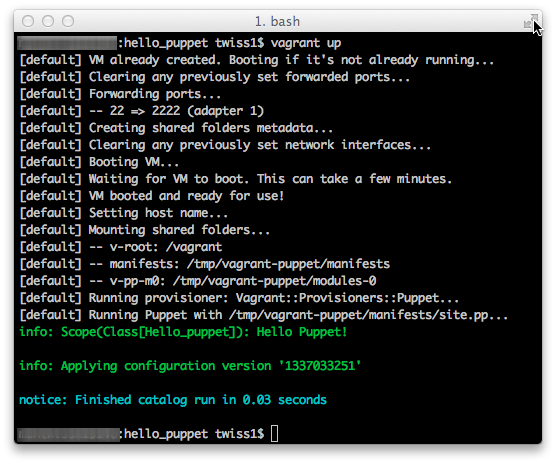
Everything worked if you get the screen above. Vagrant automatically executed Puppet to provision a module that prints “Hello Puppet!” to the console.
So cool! But not really useful.;-)
In the future we will extend that. We will be able to build virtual machines for different purposes in a purely automated fashion. The basis is our basic Vagrant box, which we will provision with different software configurations as we need them.
And again: everything fully automated and fully versioned. We are not going for anything less!
Done for today!