Remember Me?
In the last blog post we installed a basic CentOS 6.2. From there on we will set up a graphical user interface. Since we might need another server system in the future, we are not going to modify our current installation.
VirtualBox can duplicate your virtual machine by creating a clone. You need to shut down your virtual machine in order to do so.
After I cloned the virtual machine, I booted up the new one. Unfortunately the network connection did not work; there was no network interface.
While I was investigating, I came across /etc/sysconfig/network that held the old hostname. I changed it to centos62-desktop.
Of course the problem was still there: I had no network interface eth0.
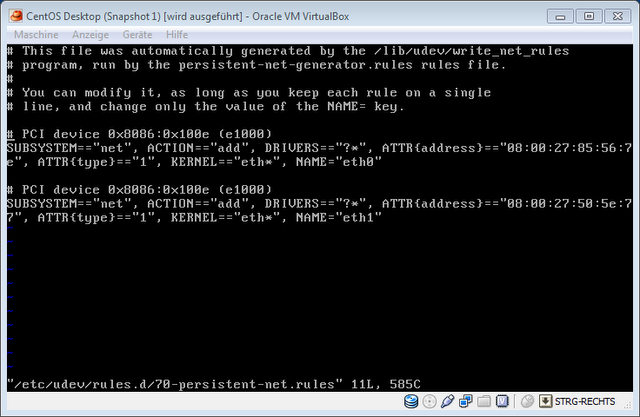
The first entry was from the original image, so I removed it. Now go back to /etc/sysconfig/network-scripts/ifcfg-eth0 and add the correct hardware address with the parameter HWADDR. In my case, HWADDR="08:00:27:50:5e:77". It was important that the address is provided within quotation marks; it wouldn’t work without them. Yep, that took some time to figure out.
Let’s Get That Desktop
That little terminal window is a good start, but of course I want a desktop environment for serious development work where I need an IDE. So I ran the following command to install the necessary binaries:
yum groupinstall basic-desktop desktop-platform x11 fonts
Thanks to this post.
After you are done with the installation, type startx. There we are—we have a new desktop.
But wait a second, you may also have this strange mouse behavior. I had it. The cursor only used part of the guest OS desktop space and “jumped out” to the host desktop. Really weird.
To get around this I had to install the VirtualBox Guest Additions, described here.
Those were the commands from the article:
yum update kernel*
yum install kernel-devel
yum install gcc
Additionally I had to install make as well to make it work.
yum install make
But there was no /media directory. The solution can be found here.
mkdir /media/VirtualBoxGuestAdditions
mount -r /dev/cdrom /media/VirtualBoxGuestAdditions
One more step to success. Still not done. I encountered the error message: “Building the OpenGL support module” [FAILED]
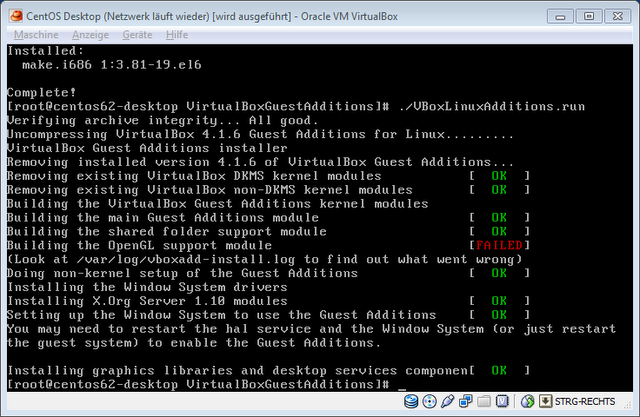
A simple command did the trick.
export MAKE='/usr/bin/gmake -i'
Sorry, I’m not sure where I got this from, but thanks to the person who provided it!
After installing the guest additions again, everything was green and the strange mouse behavior was gone.
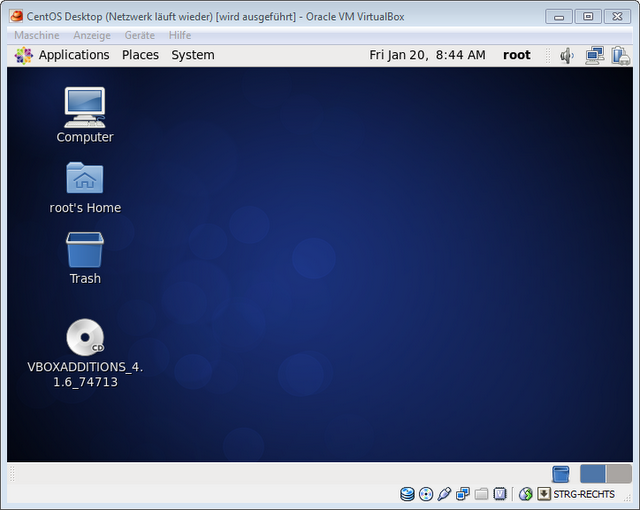
Congratulations: we now have a running CentOS 6.2 with a desktop.
Post-Work
Additionally I installed Firefox.
yum install firefox
You shouldn’t do everything as root while working with Linux. Therefore I created another user I will use for tasks in the future.
adduser myNewUser
passwd myNewUser
To look up command usage I installed the manual pages system.
yum install man
Done for today!